Originally Posted by
Prospero
I am sorry to hear some of you are experiencing difficulties with the horizontal scroll. The GUI is optimised for phones, laptops, and desktops with track pads or tracking mice. If you are using a mouse with a scroll wheel or button, there are two methods to switch from vertical to horizontal scrolling - either press shift and scroll, or hold down the mouse and drag left/right.
With the greatest of respect, as I do appreciate what AeroLOPA offers, that make it sound like it's *not* optimised then for a traditional computer with a mouse setup... unless "tracking mice" is a typo? Normal mice have a vertical scroll button and since 1996 or so it's been used to scroll through things a few lines, or a page at a time. I would wager most people wouldn't have a clue about the shift key modifier, and the site's UI is broken in terms of clicking the middle button...
The Met Office site shows the way to do it via the "since 1996" method - you can click and hold the middle mouse button, then move left and right to scroll. The cursor changes to a left-right arrow to emphasise this, and there's a scroll bar at the bottom of the "slidey" content.
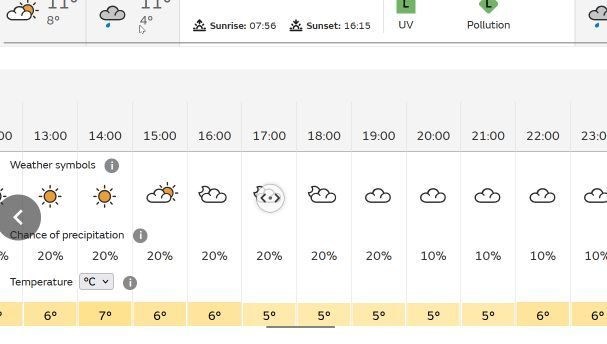
It's a little more awkward as AeroLOPA has clickable images, but if you click in a blank area you'll see it pops up an up-down cursor - and if you click and hold the whole page scrolls, not the "slidey" content. As others have noted, there's no scroll bar - and a scroll bar is a subtle way of saying "hey, there's more over here >>>".

EDIT: Screenshots are taken via a 26-year-old version of Paint Shop Pro and the current version of Firefox - other browsers have different appearances of the "scroll" cursor, but the problem remains - there's something about those horizontal scroll areas which isn't quite right, they don't work as they do on other sites.