I wanted to share a guide to the "schedule change" workflow to give you confidence about selecting the options. This was my first time seeing Frontier's schedule change (two flights in May 2023 were affected), so documented what happens.
1. You receive an email from Frontier. The subject was: “Important changes to your Itinerary - Action Required. Confirmation Code XYZABC”
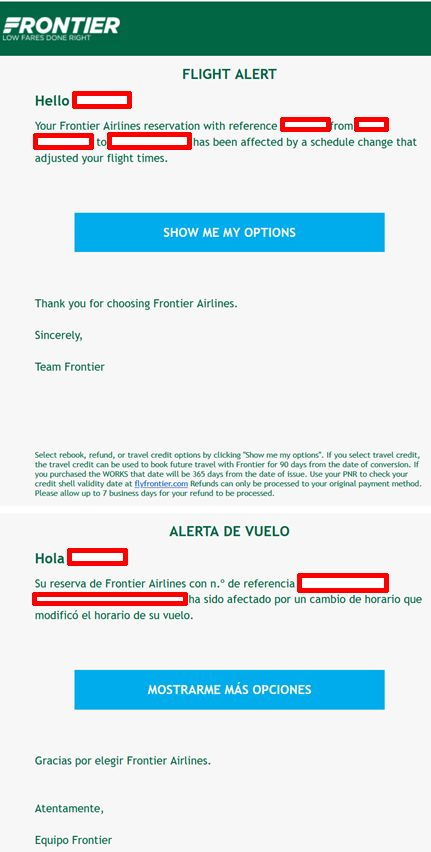 Email on Schedule Change
2. Clicking on the link brings up this screen
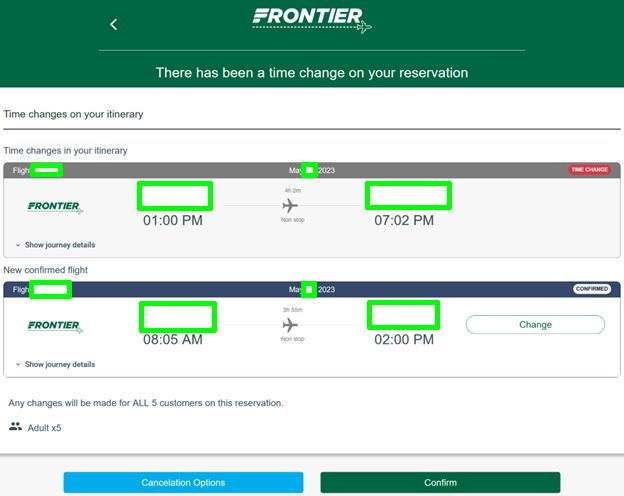
This is where I started having questions so I wanted to share here.
On the “Change” button on the right of the “New confirmed flight”, when you click that, it offers you options 24 hours before and after your original flight. Basically you are “Change”ing the new flight.
I was concerned the “Change” icon might be a permanent change, and was happy to find out it was actually a way to see more options. I thought that perhaps I was forced to take the new flight shown on this page.
The green Confirm button is what then confirms the change to the new flight. Click this once you have the new flight you want.
Cancellation Options are going to take you to requesting a refund or voucher. I didn’t open that up.
3. When you click on "Change" you'll get a screen that shows options, including the day before and after, without a change fee or fare difference, which I was pleasantly surprised to see.
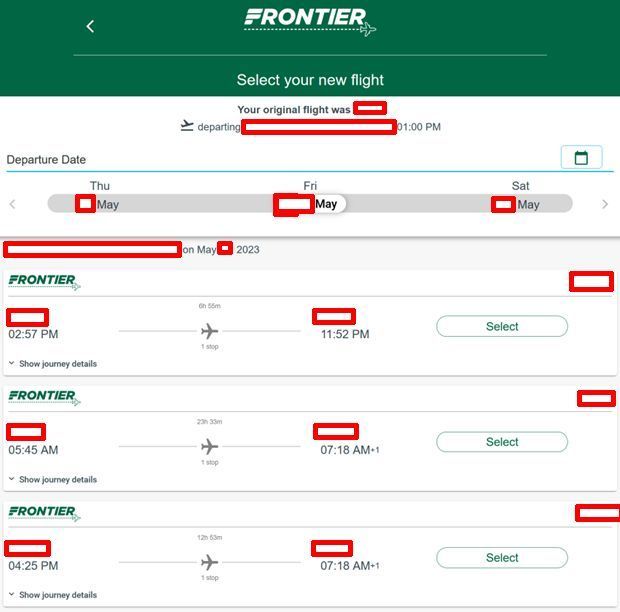 Change sub-menu, with extra options.
4. After you "Select" one of those options, then going back to the "Change/Confirm" screen will reflect the new flight you selected. Finally you can press the green "Confirm" button and your schedule will be changed.