Hey, guys! Got some exciting news for you all.
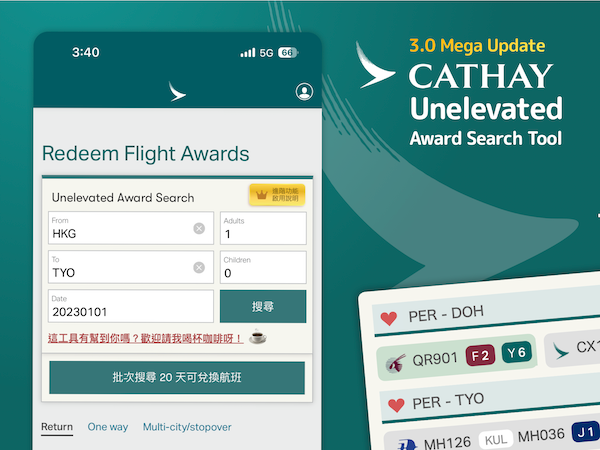
I just released v3.0 of the Unelevated Award Search Tool this past weekend, and this is a huge one.
It's such a mega update that I think it merits its own thread.
If you're new to or unfamiliar with the tool, you may want to check out
this post to get up to speed or get a quick refresh.
Basically, the tool is a browser plugin (more accurately, a userscript) that modifies the Cathay website so you can find award availability in a much friendlier manner.
Some of the main features are:
- Search for ANY route, and not just those that the CX website allows you to select.
- Skip the pointless options such as a airline and cabin class that the native site forces you to select.
- Bring back support for searching multiple airports in the same city (e.g. TYO, LON)
- See availability in all cabin classes for each flight and date in a single search.
- Batch search availability for up to 20 days.
The version 3 update includes a bunch of features that you guys have asked for, and improvements to make the tool easier to use, and less likely to fail. It also has some exclusive goodies for previous coffee donors!
All right then, lets dive right in and see what you can expect to see in v3! Let's start off with some of the improvements.
1. The origin and destination boxes now support autocomplete!

I know being able to just enter the airport codes and have it work is simple and efficient for the power users, but a lot of people had trouble knowing what airport codes to enter and had to keep looking them up. Version 3 now supports autocomplete, not just for airport codes but for city
and country names as well, so you can easily find airports you're not familiar with.
This version also comes with hotkeys, so you can press space, enter, or tab to autofill the first entry in the list. Note that using tab will take you to the next input box after autofill. On desktop, you can also use the up and down buttons to choose items from the list, and enter to select. There is also rudimentary error checking, which will alert you if you enter an invalid airport code.
2. Detects expired sessions and reminds you to login

A lot of the errors people were coming across were the result of not being logged in, or being logged out after a timeout. This version will check if a failure is due to the authenticated session being lost, and gives you a handy link to go directly to the login page.
3. Filter your search results to show only the flights you want

You can now choose to display only non-stop flights, as well as filter for flights with availability in your cabin of preference. This cuts down on clutter and makes it much easier to find the availability that you want.
4. Batch searches now have their own dedicated results page.
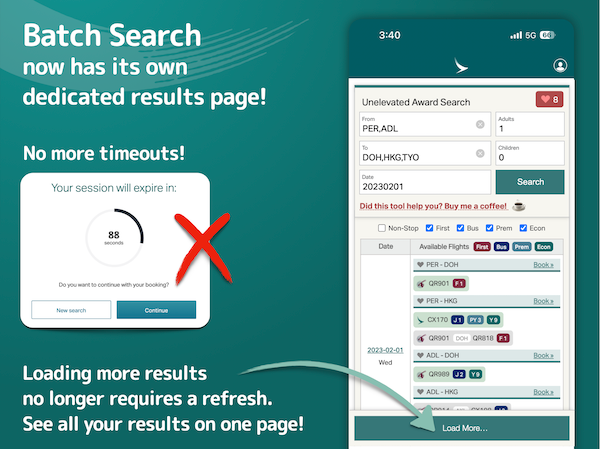
Batch search results used to load on whatever page they were requested on. One particular annoyance that resulted from this was that the pages would often encounter timeouts. Additionally, because there was often other data on the page, that made scrolling through the results and getting to key UIs of the tool somewhat challenging.
The results for batch searches are now shown on an entirely blank page, so scrolling to the top takes you directly to the search boxes. The load more button is fixed at the bottom of the screen, for easy reach whenever you need it.
Also, the page no longer needs to refresh to load the next 20 batch of results. Can I get a hooray for that? This means that all your original dates and their results will remain on the page when you load more. (Note that if you change the date or destinations, the results will be overwritten. Only "load more" will keep previously loaded results)
By the way, the dates in the batch results now show the day of the week! No more checking the calendars repeatedly to check if that available flight is on a good date.
Now, these following goodies are exclusive features for those who have bought me coffees in the past.
Seriously guys, thanks for your donations. You have been so wonderfully generous over these past months. Some of you have even been donating repeatedly, and it just blow my mind. I hope these exclusive features are a nice surprise for you. It takes quite some time and effort to build, maintain, and support this tweak, and the positive feedback and heartwarming support I've been receiving from the community has made it all the more worth it. Thank you guys, for your generous donations, especially seeing as you were all getting nothing extra in return. So here's to you guys!
1. Search multiple city pairs simultaneously in a single search!

You might have seen a clue that this was coming on the screenshot for results filtering. This one has really been a game-changer for me personally. You can now search multiple origin/destination pairs in one single search! If you're flexible and can fly in or out of a wider region, now you don't need to switch your search parameters endlessly for the same few dates. For example, if you are open to flying from HKG to any one of FRA, CDG, LHR or AMS, just search them all! At the same time! The plugin will search for HKG-FRA, HKG-CDG, HKG-LHR, and HKG-AMS for each date, one after the other. This also makes it supremely efficient to build complex round-the-world itineraries for
oneworld multi-carrier awards.
As some may recall, Cathay's website has a limit of 20 searches per key. The plugin can now request a new key without reloading, but I wanted to keep the limit there so we don't overload Cathay's servers. For this reason, the more city pairs you search, the less dates per batch you will see. For example, if you have 2 origins and 3 destinations, for a total of 6 city pairs, you will get about 4 days of results before you need to press load more again.
2. Bookmark and batch search your favourite routes!

While you search, you can now bookmark your queries by selecting the heart icon next to your route. Find a date with availability you want? Heart it, and come back to it later! Have a particular route that you've been regularly watching for availability? Heart it, and come back to run a batch search whenever it crosses your mind. The batch search for saved results works differently from regular batch results. Instead of giving you availability day by day, the batch results for saved queries searches specifically for the days and routes you have saved. Excellent for checking on award inventory releases, of to do a final availability check on your round-the-world itinerary before calling in to book it.
3. Easily build a multi city award search in just a few clicks!

If you're saving your round-the-world itinerary in your favourites, you can attempt to book it online by simply making a few clicks! If you've ever tried to operate the nightmare that is Cathay's "multi-city" award search engine, you will know that it is not just a hassle, but often near impossible to get to that last step. Mostly that's because you need to start all over again if any sector ends up having no available award inventory for the particular date you chose. Using your favourites, you can ensure availability before building a multi-city award query, so you will be certain that every sector has flights available. Then you just need to select the 6 segments you want to book, and the plugin will build the query for you automatically. No need to choose origins, destinations, airlines, and dates for six flights, and then have it to start all over again because the 5th sector had no flights!
Cathay's multi city engine seems to accept a maximum of 6 segments, so that is the max you can select. Be aware that not all itineraries can be built this way, and it depends entirely on the fare rules of each available seat, and the quirks of the "multi-city" award engine. Do note that its rules can be quite finicky, and do not always work for routings that should be valid under the
oneworldmulti-carrier award's basic 5 stopovers, 2 open jaws, and 2 transfers rule. The error messages are also usually not very helpful, often claiming that you have too many transfers or open-jaws when you do not. However, I've had success building simpler itineraries without crazy open jaws and transfers. YMMV.
If you can get to the payment page, that means routing is deemed valid by the gods of the multi-city engine. Even if you don't complete payment, a preliminary booking reference will be created in your "Manage my Booking," and you can follow up with call centre to add or alter that itinerary. It is much faster than starting from scratch.
For those of you who previously donated before the v3 release, you should have received an invitation to a BuyMeACoffee membership, which will give you access to the Extras package for free. Watch out for the invitation in your inbox! Once you've received and accepted your membership invite, go to claim the Extras package here: https://www.buymeacoffee.com/jayliutw/e/106024
Again, thank you guys for your generosity!
INSTRUCTIONS FOR UPDATING TO V3.0:
Version 3.0 is published on greasyfork, as usual: https://greasyfork.org/en/scripts/44...d-search-fixer
Edit 2023/03:
If you are installing for the first time:
https://pse.is/cxtool
If you have already set up the plugin before, and want to update:
https://pse.is/cxupdate
If you were not previously a donor, and wish to enable the premium features, see here:
https://www.buymeacoffee.com/jayliutw/e/106024
If you're on Desktop, with Tampermonkey, just go to the greasyfork page press the green "Update to version 3.0" button, and follow the instructions.
Please check in Tampermonkey settings to see if there are two Cathay scripts. If there are, delete the old one. Some of you who upgraded early may get double scripts when you update again in the future, because I made a stupid decision to remove the words "2022" from the tweak name, which made it a different plugin in the eyes of Tampermonkey. If you updated in the 24 hours when it was that name, you may get double scripts when you update again in the future.
If you're on iOS + Stay, go to the Stay App and click on the update button it it is there. If not, delete the script, and add a new one by selecting "Import from Greasyfork" and searching for "Cathay" on greasyfork.org in the Stay App.
If you're on Android Firefox Nightly + Tampermonkey, same as with desktop, go to the greasyfork page and press the green "Update to version 3.0" button, and follow the instructions.
Edit 2023/03: For all platforms, go here for update instructions:
If you're new and installing for the first time,
refer to the original post for installation instructions, iOS instructions are at #7, I will add Android instructions at a later date. go here and follow instructions for your platform:
Happy searching everyone! And as always, if this tool helped you, consider buying me a coffee! xoxo