Originally Posted by
jsguyrus
If you are booking award travel DO NOT DO IT FROM YOUR PHONE. Look for the little symbol that looks like a seat which means it is a mixed class itinerary. With international travel that generally means a first class Alaska leg and a coach class international leg. Your phone will not display the mixed itinerary symbol, even though it is.
It will give you the warning of being a mixed cabin itinerary if you add it to the cart. You can then look at the details to see which cabin each segment books into.
Usually, the long leg will be in Main, but not always. It is definitely easier on the desktop version but the presence of the seat doesn't show you the cabin mix until you click on it.
An example PHX-DFW-ICN. Short leg in Main, long leg in J.
 Partner Business award PHX-ICN.
 Mixed Cabin Itinerary warning
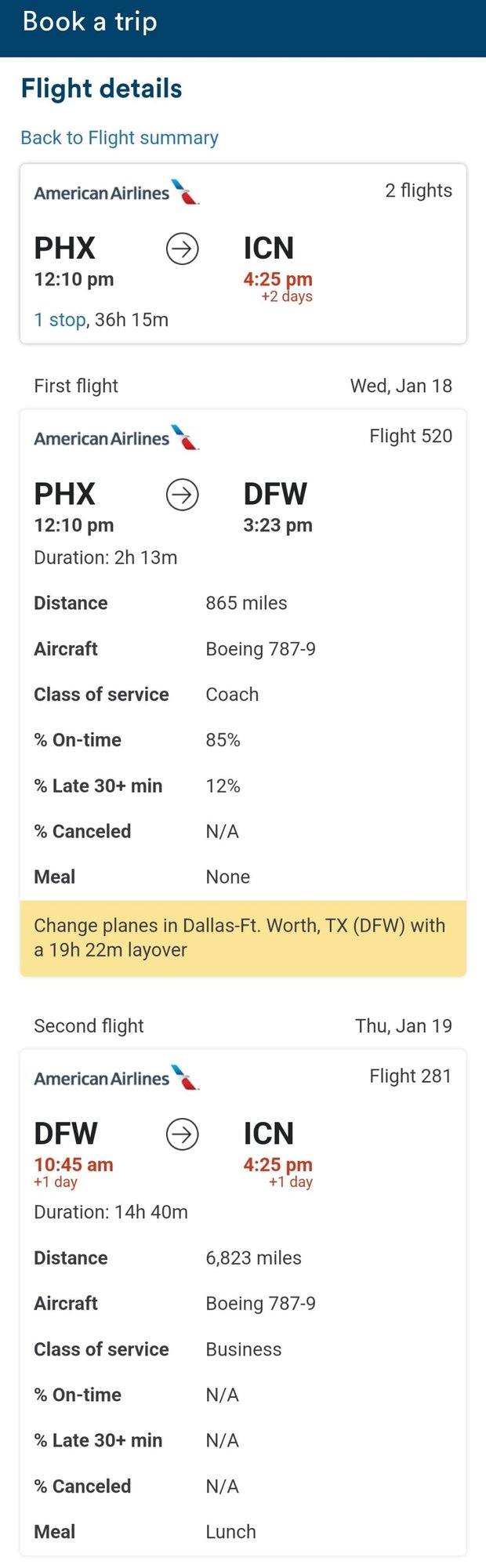 PHX-DFW in Main, DFW-ICN in Business.
James
EDIT: The PHX-DFW leg is also on a 789. If U space never opened up on that segment and you are 100K, you would still be eligible for a complimentary upgrade.