Originally Posted by
findark
The website sorts in lexicographical order, which might be leading to the confusion. That is, the prices 10k, 70k, 110k would be ordered ascending as {10k, 110k, 70k}.
This is exactly what's happening. Thanks for the explanation.
As I continue planning my trip tonight for later this month I have done a *lot* of searching and have come to notice that sometimes the sorting works correctly and sometimes it doesn't. And your explanation makes the most sense. I've never seen this for economy but then again they're usually 30-70K miles so seeing 100K+ in economy isn't a thing (yet!)
-RM
Originally Posted by
RobOnLI
Anyone else realize yet that the "Business Mixed Award" column sorts upside-down? I only realized it today when I was searching for some flights and saw a 70K business award but when I clicked to sort by price it defaults to sorting HIGHEST to LOWEST even though the arrow is pointing "down". Go click the same on Economy and when the arrow points down (as I've been used to for years) it is sorted lowest to highest.
-RM
To further prove my point that this is "broken" and that
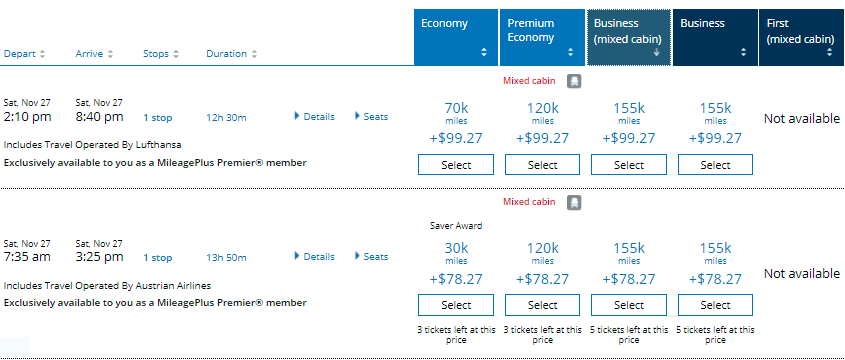
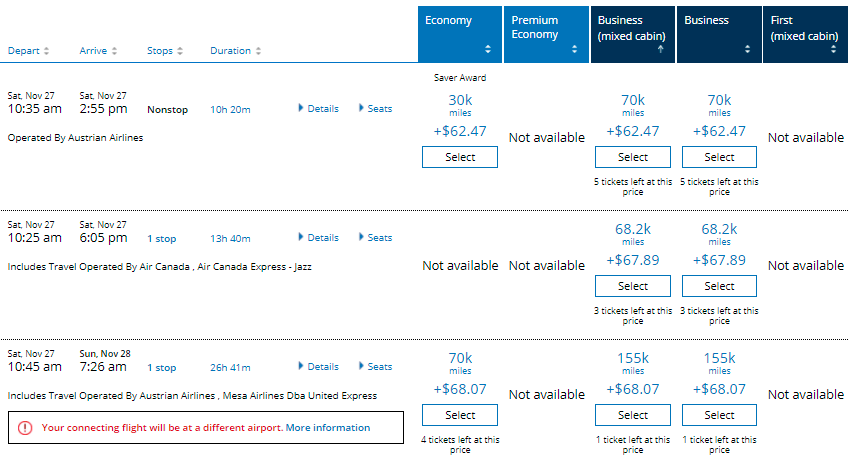
findark is correct, here are two screenshots of exactly the same search sorting by the "Business Mixed Cabin" column. Notice the arrow. On the down arrow (which should sort lowest to highest), it actually has much higher results at the top. Then notice on the up arrow that the results are ordered 70K, 68K then 155K. So it's in reverse order of first significant digit only. How the hell are we supposed to find the "cheapest" flights easily this way?
-RM