Originally Posted by
Flying Machine
just tracked a Hertz booking (That I made this morning) booking is for a HLE location near PHL airport. I received a lower offer from autoslash however the Priceline site gave me 354 offers at every outside of the airport facility, I tried using the filter but that seemed not to really narrow down my preferences. Why when tracking an airport location do we only track to that location, but an outside of an airport location the whole city pops up?
Well when tracking an airport you probably are flying in and the system assumes that you want to pick up at the airport and not some location halfway across the city, so it only offers you companies located at the airport or that service the airport via shuttle.
For an off-airport location, there are some nuances. The first one is that we have not found a way to search Priceline using a specific address, therefore we have to search by the city name (Philadelphia in this case). Priceline probably uses the Google Maps API or something similar to find the geographic center of the city which looks to be City Hall.
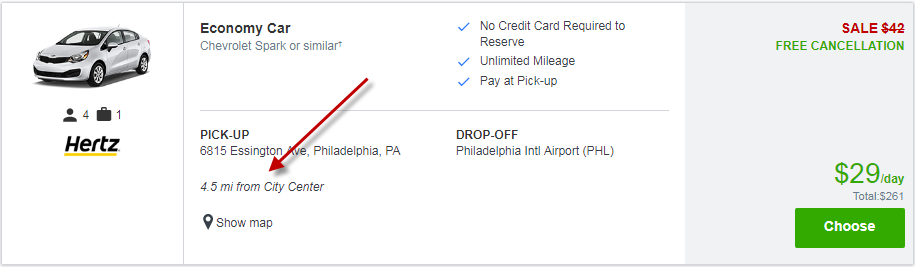
They have some sort of smart-algorithm which decides what to show for a given search. In theory, it should relevant results when searching in a city like NYC or Philly with a high density of rental locations, or when searching in a rural area where there are only a handful in each down and they need to expand the search radius. Sometimes it works well, other times, not so much.
Keep in mind that the filters on the left can be super handy for narrowing things down. For example, let's say that we offered you a discounted rate on a Fullsize car with Hertz. You click on the link from our email, and then, using the filters on the left, check only Hertz and only Fullsize. That brings the total down from 354 to 12--a much more manageable number.
The other thing you can do is to add a parameter to the Priceline search url in your browser. For example:
Here's the default search showing 392 vehicles found:
https://www.priceline.com/drive/sear...pe=Non-Airport
If I add
&radius=2 (for 2 miles) to the end of it like this:
https://www.priceline.com/drive/sear...rport&radius=2
...now we're down by almost half to 208 vehicles found. I believe the valid values for the radius parameter are 1,2,5,10,15,25. They used to have it exposed in their interface, but they removed it a while back, but it's still suppored.
I hope this helps. Feel free to contact us if you have any additional questions or need further assistance.