So I couldn't get their website to work worth a damn and sitting on hold with them was ridiculous. I downloaded their app and was able to easily assign seats for both my girlfriend and myself. We're traveling on a United award ticket in UA F but OZ J in March (F not available between Korea and Japan). We're on different PNRs so I had to assign them separately but it was no sweat.
I was only able to check it out on iOS but hopefully this helps.

After installing the app you'll have to set your region and language settings; US and English worked just fine. On the home page select "View Reservations"

Select "For Guests"

Then in a redundant step select "View Reservation for Non-members"

Enter your PNR and select your date of travel followed by selecting "Search"

You'll be taken to this screen where you'll see your PNR and name. Scroll down to:

Here you can verify your flight details and select "Seat Assignment"

You'll see your flight number, date, and time are displayed then select "Seat Assignment"
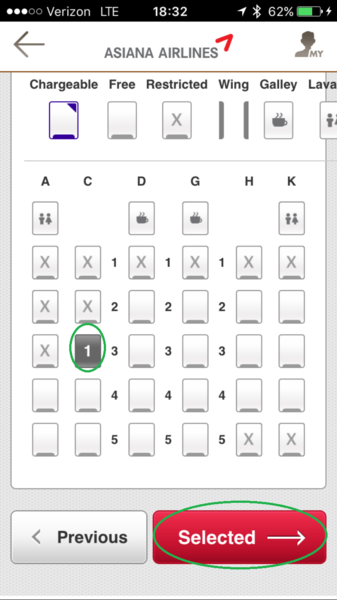
Scroll down a bit to see the full seat map and select your seat. I was able to grab 3A and 3C for us (again, separate PNRs so I had to do it separately). Select "Selected" (

)

Here you'll see your selected seat next to your name. Finalize by selecting "Selected".
IMPORTANT: At this point you'll be logged out and it will give you the option to log in with Asiana Club credentials. I then went back to the home page and looked up our reservations as a guest and verified that the seats were indeed assigned. Additionally, the seat map of one reservation showed the others seat as taken AND it shows on United's website as well. ^
Hope this helps everyone!